วันจันทร์ที่ 9 กันยายน พ.ศ. 2556

เทคโนโลยีในอนาคต

Mobile script Concept 

แนวคิดหน้าจอระบบ สัมผัสที่สามารถดึงเข้า-ออก


               โดย แนวคิดโทรศัพท์มือถือร่วมสมัย เพื่อต้องการความคล่องตัวในการใช้งาน ด้วยหน้าจอระบบสัมผัสขนาดใหญ่ 9.5 นิ้วที่สามารถดึง เข้า-ออกจากตัวเครื่องด้านข้างได้ หรือที่เรียกว่า "Script Concept" ซึ่งเหมือนวิธีการ ส่งสาร จดหมายสมัยโบราณ ที่ส่งเป็นลักษณะม้วนกระดาษ นับว่าเป็นแนวคิดที่ดี ที่สามารถนำมาประยุกต์ใช้ในสมัยใหม่ได้ดีทีเดียว

ผลงานการออกแบบของ Aleksander Mukomelov

computer

Google X   สุดยอดโครงการในอนาคตของกูเกิล

As you know, Google - is not only a search engine: The company is a world leader in the creation of gadgets, internet services, and more. The most curious development team is engaged in a secret Google X, and among their projects -  here are 10 ideas that the Internet giant seeks to bring to life.
ก็ อย่างที่เราทราบกันดีว่า Google ไม่ใช่เพียงแค่ Search Engine (เว็บไซต์ให้บริการสืบค้นข้อมูล)  แต่เป็นบริษัทยักษ์ใหญ่ที่สร้างสรรค์ Gadgets (อุปกรณ์อิเล็กทรอนิกส์ขนาดเล็ก)  การให้บริการต่างๆ ผ่านเครือข่ายอินเทอร์เน็ต ฯลฯ   แต่ตอนนี้ทีมงานพัฒนาสุดเทพ (the most curious development team) ของพวกเขา  กำลังซุ่มทำโครงการลับ Google X (x คือ 10 ตามเลขโรมันนั่นแหละ)


googlefuture01 10 проектов будущего от Google
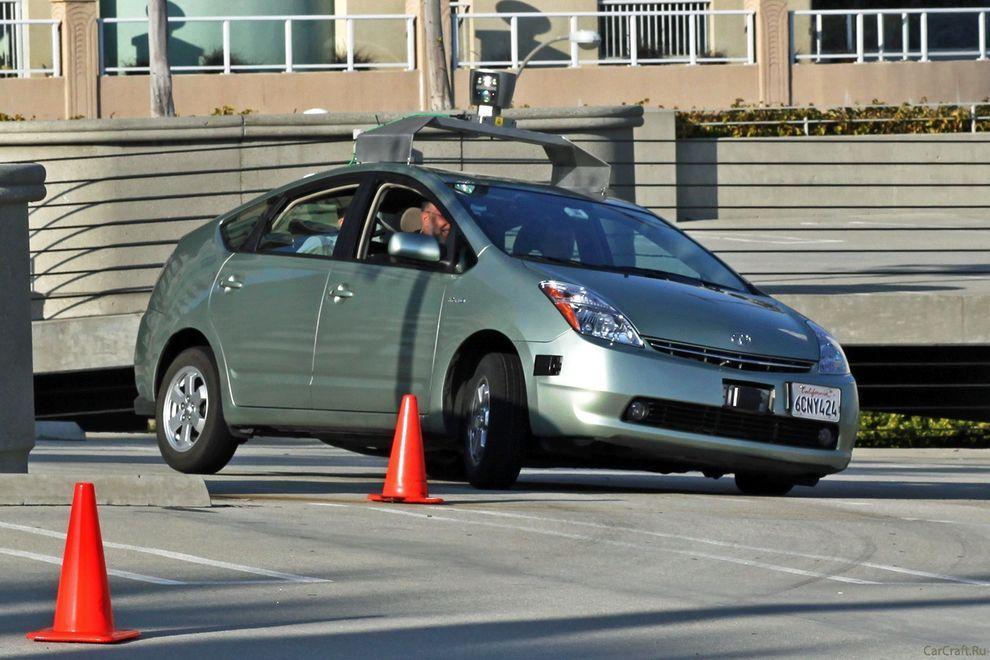
1. Car without a driver will make road traffic safer
Experts of Google X for several years working on the project Driverless Car Program.
Negotiations are underway with the authorities for permission to test the self-governing vehicles on public roads - as long as this agreement only states of California and Nevada.
A fleet of ten vehicles with test systems allow run over more than 480 thousand km (as of August of 2012), and of course, tests are continuing. However, it is unclear when such a system will be commercially available.

โครงการขั้นเทพแรกสุดของเจ้าพ่ออินเทอร์เน็ตรายนี้ก็คือ รถยนต์ไร้คนขับ   กูเกิลต้องไปเจรจาขออนุญาตจากทางการ
(negotiations are underway with the authorities for permission) ที่จะทดสอบรถยนต์ที่มันควบคุมตัวมันเองได้  (to test the self-governing vehicles)  บนถนนหลวง (on public roads)  ของสองมลรัฐเท่านั้น คือ มลรัฐแคลิฟอร์เนีย (แค่รัฐนี้ก็มีพื้นที่ใหญ่กว่าประเทศไทยแล้ว)  กับมลรัฐเนวาดา  (ก็ อย่างว่าแหละ ถนนในสองมลรัฐนี้มันวิ่งผ่านทะเลทรายซะเป็นส่วนใหญ่ การจราจรบนถนนมันจึงเบาบาง จึงเหมาะกับการทดสอบรถยนต์อัจฉริยะของกูเกิลเขาล่ะนะ)   ตอน นี้พวกหมู่เขาชาวกูเกิลก็เลือกเอารถยนต์รักษ์โลก Toyota Prius สุดยอดรถยนต์ลูกผสม (Hybrid) อันโด่งดังของค่ายรถยนต์ยักษ์ใหญ่ของโลก (ขณะ นี้ Toyota เป็นกลุ่มยานยนต์ที่มียอดการขายรวมสูงสุดเป็นอันดับ 1 ของโลกไปแล้ว  จากรถยนต์ในกลุ่มหลายแบรนด์ คือ Toyota, Hino, Dihatsu, Lexus)  มาทำการทดสอบระบบนี้อยู่  มีรถยนต์ที่ทดสอบระบบนี้นับสิบคัน  ต้องวิ่งยาวๆ เกือบ 5 แสนกิโลเมตร  เลยทีเดียว


googlefuture02 10 проектов будущего от Google
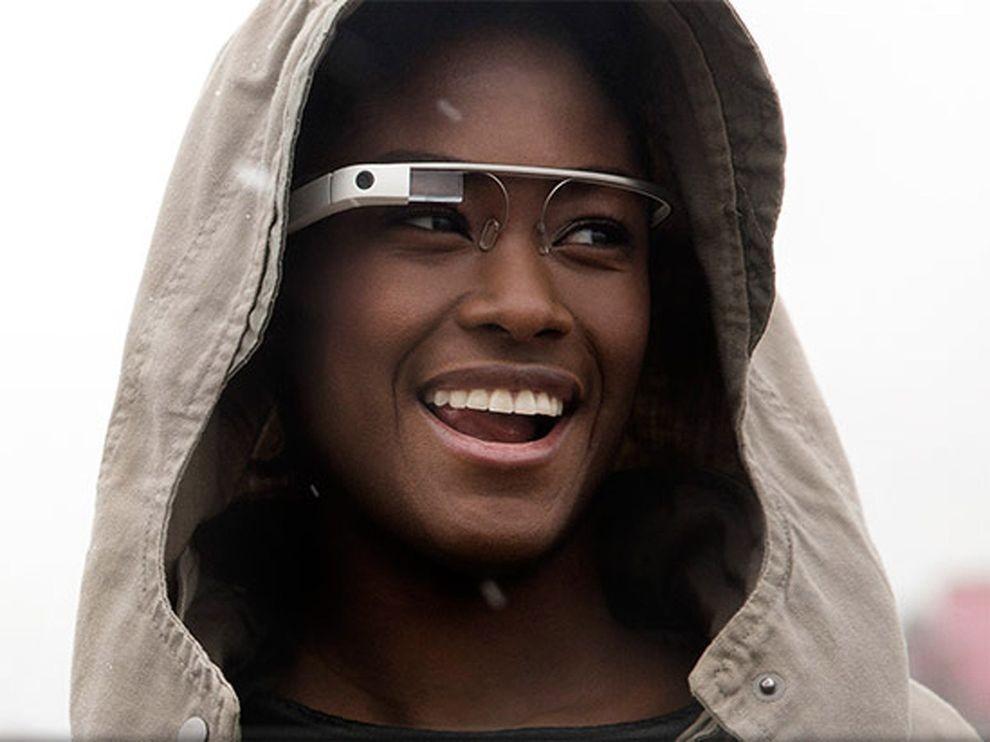
2. Google Glass will change the way you think about gadgets
Having put on those glasses, you can forget about the screens of smartphones and computers - the right information will always be available in only one eye movements.
One way to look up - and before you calendar, email, social networks, weather, in general, everything that you want.
Google Glass makes a revolutionary technology available to a wide range of people so far only a few lucky people, mostly developers and journalists were able to get a working prototype of points, but the consumers opportunity arises next year.

แว่นตาวิเศษของกูเกิล
 คือถ้าลองได้สวมแว่นตาสุดเทพนี้ละก็  เห็นท่าว่าเราคงจะลืมหน้าจอของสมาร์ตโฟน (ที่เราว่าเจ๋งแล้วนา) และหน้าจอคอมพิวเตอร์สุดโปรดของเราไปเลย  คือ ข้อมูลข่าวสารทั้งหลายที่เราอยากจะรู้  อาทิ วันเวลา  อีเมล์  สภาพอากาศ  แม้แต่สื่อสังคอมออนไลน์ (อาทิ facebook)  มันจะเผยโฉมให้เราเห็นได้ เพียงแค่เรากระดิกพลิกตาเราเท่านั้นแหละ (หวังว่ากูเกิ้ลคงไม่ได้โม้นะ) 


googlefuture03 10 проектов будущего от Google
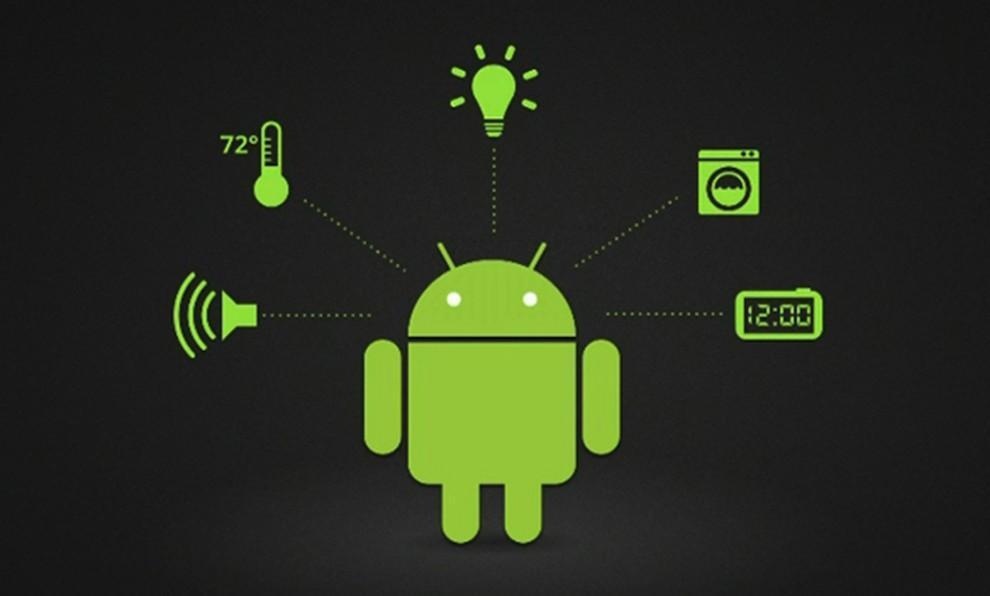
3. "Smart House" according to Google
The technology, called Android @ Home, will fully automate all of the life support system by connecting to the Internet, for example, while you are not home, a refrigerator will be able to order the necessary products itself, and coffee maker to make coffee exactly to your arrival.
Android @ Home will connect all electrical appliances.

บ้านอัจฉริยะ
 
ในแนวคิดของกูเกิ้ล  เทคโนโลยีนี้เรียกว่า 
Android @ Home  ซึ่งจะเนรมิตให้บ้านกลายเป็นบ้านอัตโนมัติ ด้วยการเชื่อมต่อกับอินเทอร์เน็ต  ยกตัวอย่าง  ขณะที่เราไม่อยู่บ้าน ตู้เย็นในบ้านเรามันสามารถจะสั่งของกินเอาไว้ให้เราได้เอง  และเครื่องชงกาแฟมันก็ชงกาแฟไว้คอยท่าเราตอนกลับบ้าน   ระบบแอนดรอยด์@โฮมที่ว่า มันจะเชื่อมต่อกับเครื่องใช้ไฟฟ้าทั้งหลายแหล่ในบ้าน


googlefuture04 10 проектов будущего от Google
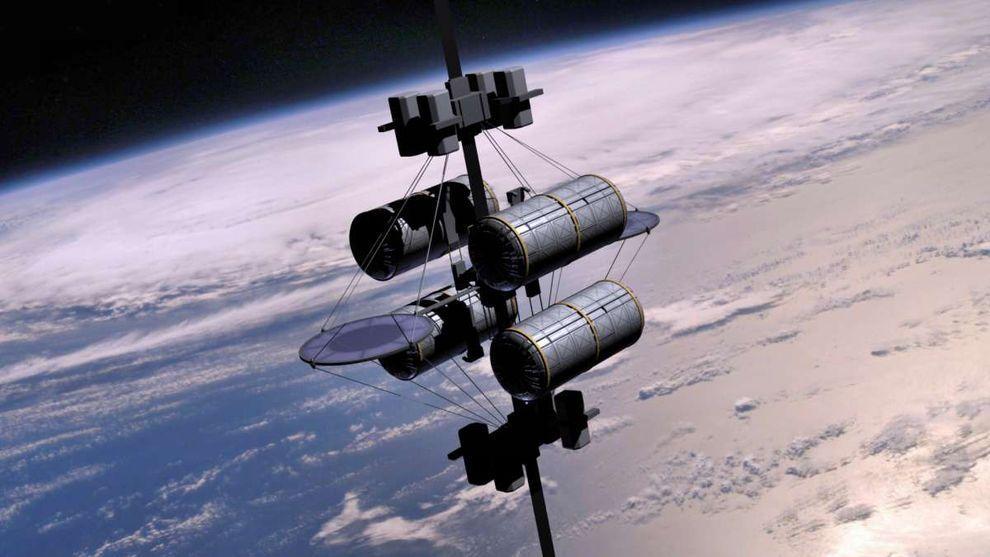
4. Space elevator
According to published in the journal «Time» information Google X team in 2011, the year included the idea of ​​a "space elevator" in the so-called list of "What if ...". I must say, the very concept of this method of delivery to the orbit of people and goods put forward by K. Tsiolkovsky in 1895, the year.
Do not wait for Google's early implementation of this idea - the development of "lift into orbit," presents many technical challenges, and all the more likely to say that to implement this idea in life is impossible. However, it's probably Google thus "cover their tracks" to save the process of developing a secret.

ลิฟต์อวกาศ
 
เป็นแนวคิดที่จะส่งอะไรต่อมิอะไรไปไว้ในอวกาศ (the very concept of this method of delivery to the orbit of people and goods) ซึ่งถ้าจะว่าไป ก็คงเป็นข้อมูลข่าวสารนั่นแหละ เพราะเมื่อมันอยู่ในอวกาศได้ โอกาสที่มนุษย์ธรรมดาจะไปล้วง ไปเจาะ ไปแฮ็กข้อมูล มันก็คงจะยากขึ้นอ่ะนะ

 
googlefuture05 10 проектов будущего от Google
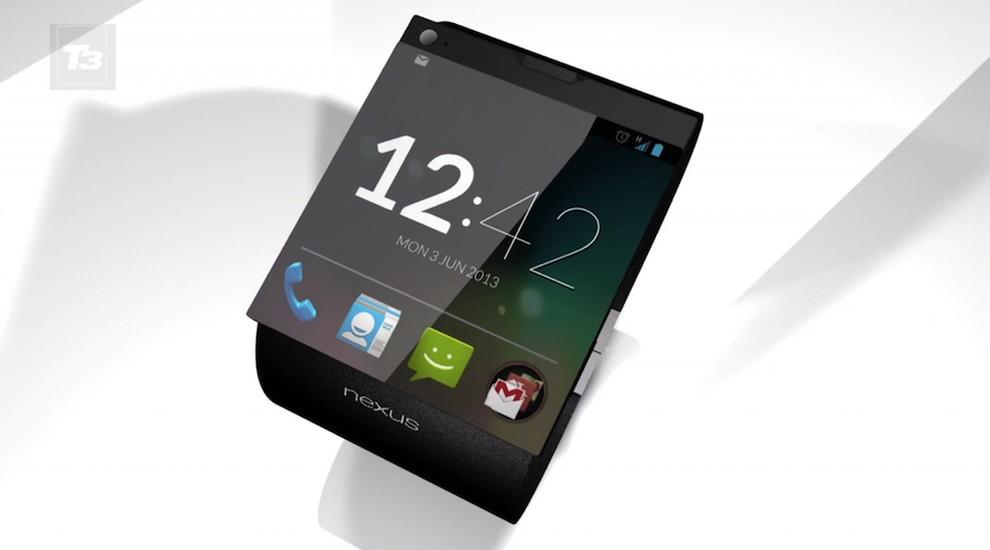
5. Watch a smartphone based on Android
Recently, it was reported that Google is preparing a direct competitor iWatch from Apple - a watch, combined with the smartphone: of course, watches SmartWatch smartphone from Google will use the operating system Android.
This latest «must have»-new to the gadget lovers will be available early next year.

นาฬิกาอัจฉริยะ
 
SmartWatch  ที่รวมเอา smartphone กับนาฬิกา มาไว้ด้วยกัน  แล้วใช้ระบบปฏิบัติการ Android  ก็คือคู่แข่งของ iWatch จากค่าย Apple นั่นแหละ 

 
googlefuture06 10 проектов будущего от Google
6. Google will take care of your health
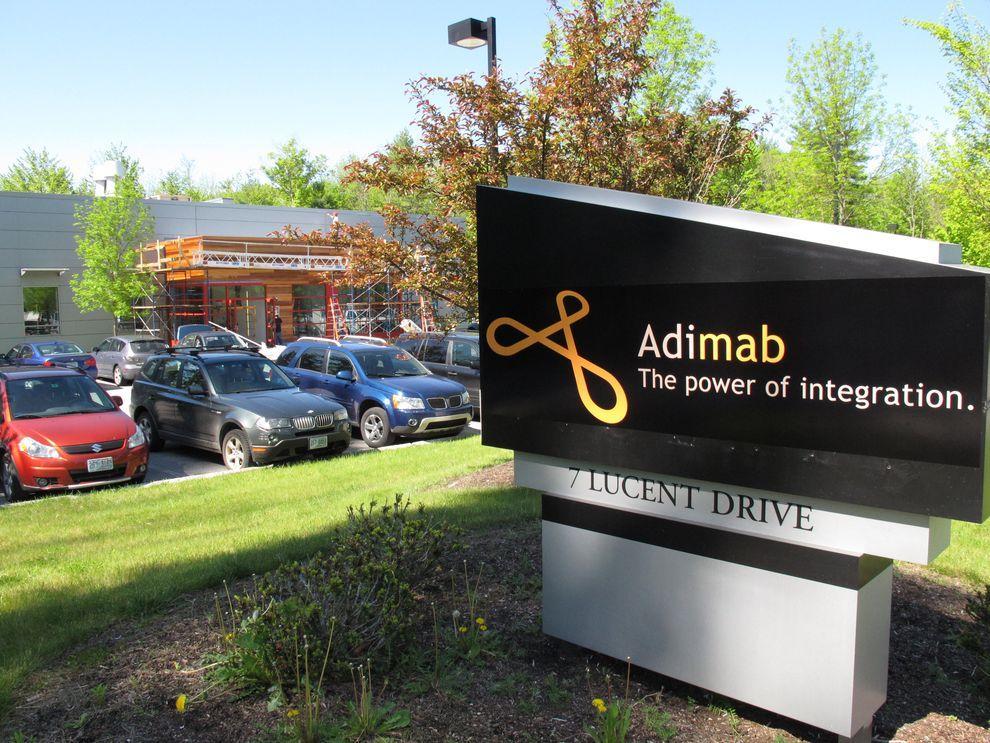
The Internet giant has a stake in the company Adimab, engaged in the development of diagnostics and treatment of various diseases, which would bring a variety of technologies and methods to combat diseases. The revolutionary idea is the invention of miniature sensors involved in the search and optimization of antibodies produced by the body - to start treatment only need to swallow such a sensor.
Another development in the field of Google Health is a subsidiary of iPierian, creating the technology of "cellular reprogramming» (cellular reprogramming), which will fight the disease by modifying cells.
 Google เพื่อสุขภาพ   กูเกิลเข้าไปถือหุ้นในบริษัท Adimab  ที่ทำธุรกิจเกี่ยวกับการพัฒนาและวิจัยเกี่ยวกับการตรวจและรักษาโรคต่างๆ  แนวคิดก็คือ การประดิษฐ์ miniature sensors (ตัว ตรวจจับขนาดจิ๋ว) ที่จะตรวจหาและปรับสารแอนติบอดีในร่างกายคน  เพื่อเริ่มการรักษา เพียงแค่กลืนตัวเซนเซอร์ที่ว่านี้เข้าไปแค่นั้น (to start treatment only need to swallow such a sensor)  นอกจากนี้กูเกิลยังจะพัฒนา Cellular reprogramming  (การโปรแกรมใหม่ให้เซล)  ซึ่งจะช่วยต่อต้านโรคร้ายได้ ด้วยการปรับแต่งเซลใหม่

  
googlefuture07 10 проектов будущего от Google
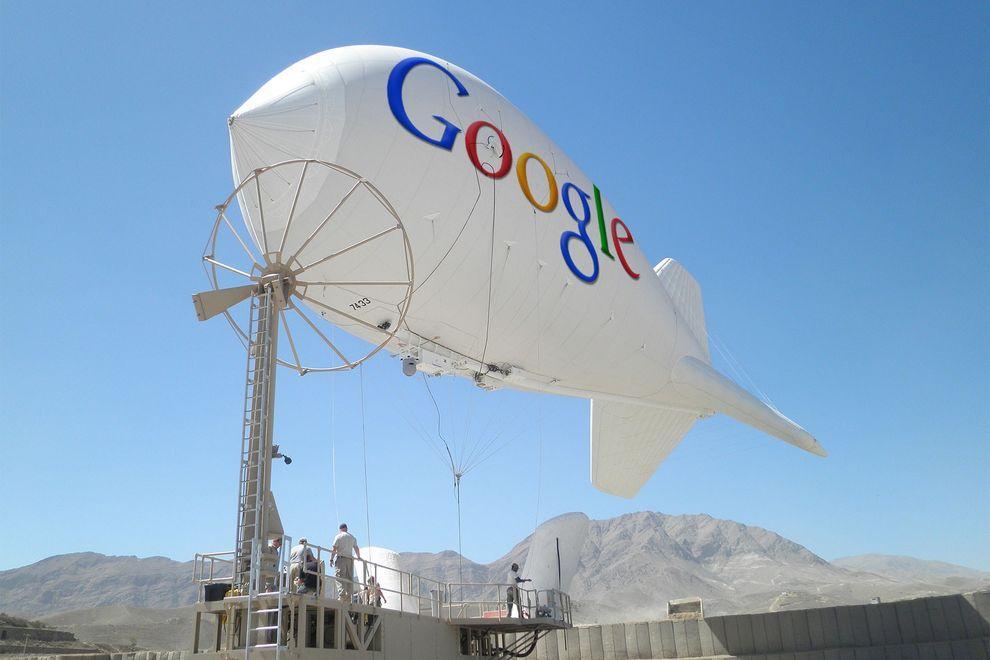
7. Internet airships cover the entire planet wireless
Google's ambitions as a provider of Internet reached all-time highs - the company is developing airships that will provide wireless connectivity the entire planet, including remote regions in Africa and other parts of the Earth.
If the project is realized, the "world wide web" will get about another 1 billion people - mostly residents of the "third world."
 
ยานอินเทอร์เน็ต
   เพื่อจะทำการส่งสัญญาณอินเทอร์เน็ตแบบไร้สายไปให้โลกทั้งใบ  ไม่ว่าจะอยู่ส่วนไหนในโลก  อาทิ ดินแดนที่ห่างไกลในทวีปแอฟริกา  ก็สามารถเข้าถึงอินเทอร์เน็ตได้


googlefuture08 10 проектов будущего от Google
8. Game console based on Android
The popularity of the Android platform is growing all over the world, and Google is seeking to use its potential to the maximum.
«Wall Street Journal» spoke about the development of the gaming console from Google, which is designed to be a "killer" similar technology "Yabloko» - Apple TV: game console from Google allows you to run any Android-games directly on your home television.

เกมคอนโซลในระบบแอนดรอยด์   
แพ ล็ตฟอร์มแอนดรอยด์มาแรงแซงเวอร์ไปทั่วโลกแล้ว  ยักษ์กูเกิลก็จะยิ่งดันให้มันแรงสุดๆ ไปเลย ด้วยการสร้างเกมคอนโซลที่สามารถรันได้จากสมาร์ตทีวี (ตอนนี้ประเทศไทยยังไม่มีอ่ะนะ ทีวีอัจฉริยะแบบที่ว่า)

 
googlefuture09 10 проектов будущего от Google
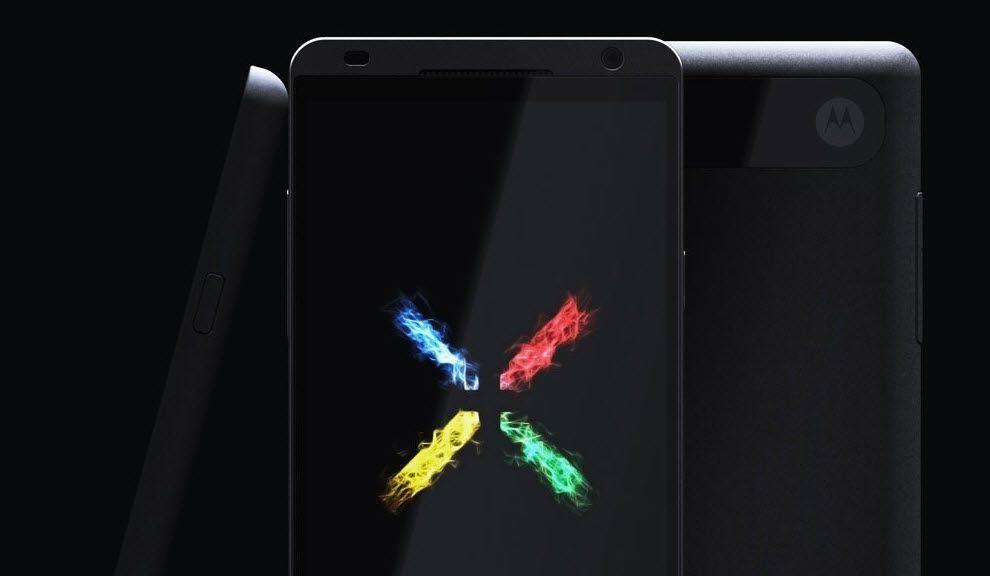
9. The way Google determines the development of smart phones Motorola
Buy Google of Motorola Mobility (transaction was $ 12.5 billion) to become the owner of the first allowed 24.5 thousand patents and designs.
Under the wing of the Internet giant will release a smartphone Motorola Moto X based on Android, which has all the modern features and characteristics, as well as, of course, a number of trendy "chips", which has no rivals - release date already quite close.
 Moto X สมาร์ตโฟน   กูเกิลไปจับมือกับค่าย Motorola สร้างสมาร์ตโฟน Moto X ที่รันบนระบบแอนดรอยด์  โดยกะว่า จะมีศักยภาพไร้เทียมทานกว่าใครใคร
 
googlefuture10 10 проектов будущего от Google
10. Eco-friendly sources of energy
 
The company Makani Power - developer of advanced technologies in the use of wind and solar energy: Google previously invested in the company a lot of money, and recently acquired in its entirety and included in the project, which deals with Google X.
The best-known development Makani Power - wind turbines, hovering at an altitude of almost 300 m to 650 m-minute and allow to generate electricity out of thin air.

 
แหล่งกำเนิดพลังงานที่เป็นมิตรกับสิ่งแวดล้อม   ใช้เทคโนโลยีก้าวหน้าจากพลังงานลม และพลังงานแสงอาทิตย์  กูเกิลกับพันธมิตรลงทุนไปหลายตังค์ในการพัฒนา 


อ้างอิงจาก http://occupatech.blogspot.com ขอขอบคุณมากค่ะ


วันจันทร์ที่ 15 กรกฎาคม พ.ศ. 2556

What/How About Our Home Network is?

What/How About Our Home Network is?

by  Teacher  Phaitoon  Yaemprasuan  :  occupatech@gmail.com
                                   http://picta55.blogspot.com 


   I have known from students of my computer classes that the Internet connection 
at their homes is of TOT provider. Yes, my internet service provider (ISP) is TOT too. 
What/how is my home network?  The modem-router is the main device of the network
because it plays many roles as of the followings : -
   1) to simulate itself like a server computer
   2) to act as a hub/switch of the wired connection
   3) to be an access point sending packets of the wireless connection
   4) to play as an ADSL modem connecting Internet
   5) to be a router managing the how-to connect to other devices
รูทราบจากนักเรียนหลายคนที่เรียนวิชาคอมพิวเตอร์กับครูว่า ที่บ้านของพวกเขามีการเชื่อมต่ออินเทอร์เน็ต
ผ่านผู้ให้บริการอินเทอร์เน็ต ทศท.(TOT) ซึ่งที่บ้านครูก็ใช้บริการของ ทศท.เหมือนกัน  แล้วระบบเครือข่าย
ที่บ้านเราจะเป็นแบบไหน?  อุปกรณ์หลักก็คือ โมเด็ม-เราเตอร์ (modem-router) ซึ่งอุปกรณ์นี้จะทำหน้าที่
หลายบทบาทด้วยกัน คือ
   1) จำลองตัวเองเป็น server computer
   2) เป็น hub/switch ของการเชื่อมต่อแบบใช้สาย
   3) เป็น access point ทำหน้าที่ส่งแพ็คเก็ตส์ในระบบเครือข่ายไร้สาย
   4) เป็น ADSL modem เชื่อมต่อ Internet
   5) เป็น router บริหารจัดการเชื่อมต่อกับอุปกรณ์/คอมพิวเตอร์อื่นในเครือข่าย

Be sure, most of our home network is hybrid. One is wired while another is  wireless.
Although a home network is not complex, but its system is so smart and its Internet 
connection is so clever with the ADSL technology. The superstar is a "modem-router", 
the genius device.
โฮมเน็ตเวิร์กที่บ้านส่วนใหญ่เป็นไฮบริด คือ ผสมกันทั้งแบบมีสาย (wired) และแบบไร้สาย (wireless)แม้
ว่าระบบโฮมเน็ตเวิร์กอาจจะดูไม่ซับซ้อนอะไรมาก  แต่ระบบเครือข่ายนี้ก็ไม่ไช่ธรรมดา การเชื่อมต่ออินเทอร์เน็ต
ก็ทำได้ดีด้วยเทคโนโลยี ADSL และแน่นอนว่า อุปกรณ์อัจฉริยะของระบบก็คือ"modem-router" นั่นเอง


The composition of any home network 
(e.g. home internet connection of students)

     UTP :  Unshielded Twisted Pair cables are so common in any computer rooms  e.g.
 classroom102 of our school. The UTP cable is caped with a connector which is called RJ
-45. The RJ-45 connector will be inserted into the LAN port of any Ethernet card/router/
switch/hub. (The RJ-11 connector of the phone line is smaller than RJ-45).
สายเคเบิลแบบยูทีพี (UTP) หรือสายคู่บิดเกลียวไม่หุ้มฉนวน (Unshielded Twisted Pair cables) จะพบ
ได้ทั่วๆ ไปในห้องคอมพิวเตอร์ อาทิ ห้องเรียนคอมพ์102 ในโรงเรียนของเรา  UTP จะถูกเข้าหัวด้วยหัวต่อ 
หรือคอนเน็กเตอร์ (Connector) ที่เรียกว่า RJ-45  ซึ่งหัวต่อนี้จะถูกเสียบไว้ที่ช่องเสียสายแลน หรือแลนพอร์ต
(LAN port)   เราเตอร์ สวิตช์ หรือฮับ  (ขณะที่หัวต่อ RJ-11 ของสายสัญญาณโทรศัพท์จะมีลักษณะเหมือน
กัน แต่มีขนาดเล็กกว่า) 

What is ADSL? (www.wikipedia.org):It is"Asymmetric Digital Subscriber Line"technology.
This is a data communications technology that enables faster data transmission over 
copper telephone lines than a conventional modem can provide. (Modem is a device 
that manages the joint communication between the phone and the computer.)
ADSL คืออะไร? (www.wikipedia.org สารนุกรมเสรี) อธิบายว่า "Asymmetric Digital Subscriber
 Line" technology.  เป็นเทคโนโลยีโทรคมนาคมที่ทำให้การส่งข้อมูลผ่านสายโทรศัพท์ที่ปกติจะเป็นสายทอง
แดงนั้น ทำได้ดีมีประสิทธิภาพมากกว่า การใช้โมเด็มธรรมดา (Modem เป็นอุปกรณ์ที่จะทำหน้าที่บริหารจัดการ
สัญญาณจากโทรศัพท์และสัญญาณจาคอมพิวเตอร์ให้มาทำงานร่วมกันได้)


     Another one I would like to refer to is "protocol". What is it? A protocol is a system 
of digital message formats and rules for exchanging those messages in or between 
computing systems and in telecommunications. And in our network we use the TCP/IP 
(comes from "Transmission Control Protocol and Internet Protocol). Now Thailand uses 
IPv4 protocol, but Thai government by Prime Minister Yingluck  Shinawatra is going to 
change the Internet protocol of the country with another version, IPv6 protocol, which
has more capacity and efficiency of transmission.  
     และมีอีกเรื่องที่ครูอยากจะพูดถึงก็คือ "โปรโตคอล" มันคืออะไร?  ถ้่าจะว่าไปนะ คำๆ นี้ มันเป็นภาษาที่ใช้
ในวงการฑูตเขา คือกรณีที่ต้องมีการติดต่อสื่อสารกันระหว่างพวกฑูตของประเทศต่างๆ เขาก็จะต้องมีวิธีการมาตร-
ฐาน ระบบระเบียบต่างๆ ที่เข้าใจตรงกัน และเขาเรียกว่า protocol ทางวงการคอมพิวเตอร์ก็ไปขอยืมคำศัพท์
ของเขามาใช้บ้าง  โปรโตคอลของเครือข่ายคอมพิวเตอร์ (www.wikipedia.org) ก็คือ ระบบของรูปแบบข่าว 
สารเชิงดิจิตอลและกติกา ของการแลกเปลี่ยนกันระหว่างระบบคอมพิวเตอร์และโทรคมนาคม  ซึ่งทุกวันนี้ โปรโต-
คอลที่เราใช้ในเครือข่ายนั้น คือ ทีซีพี/ไอพี (โปรโตคอลควบคุมการส่งข้อมูล และอินเทอร์เน็ตโปรโตคอล)  และ
 ตอน นี้รัฐบาลไทย ภายใต้การนำของ ฯพณฯ ยิ่งลักษณ์ ชินวัตร  ก็กำลังปรับเปลี่ยนอินเทอร์เน็ตโปร-
โตคอลของประเทศเรา ที่ขณะนี้เป็นเวอร์ชัน 4 ให้เป็นเวอร์ชั่น 6  เพื่อรองรับปริมาณของเครือข่าย 
และประสิทธิภาพที่ขยายเพิ่มขึ้น 

Because each computer of the network has its own unique "IP-address", what/how is it?
As I have just told you (see, first paragraph) that the modem-router simulates itself like 
a server computer, sure its IPaddress must be static, e.g. (IPv4) 192.168.2.1, 192.168.
1.1, 192.168.0.1 etc. , on the other hand it lets the other connected computer the 
dynamic/automatic IPaddress. Yes, the modem-router of the home network is the 
gateway to Internet.
พราะเครื่องคอมพิวเตอร์แต่ฃะเครื่องในระบบเครือข่าย ต่างก็มีรหัสไอพี (IP-address) เฉพาะตัวไม่ซ้ำกัน 
เหตุไฉน/อย่างไร?  ก็ตามที่ึรูได้กล่าวไปแล้วว่า  modem-router จะจำลองตัวมันเองเป็นเสมือน server 
computer  แน่นอนว่า ตัวมันเองก็จะต้องมีรหัสไอพีที่แน่นอนตายตัว อาทิ (ถ้าดูตาม IPv4)  192.168.2.1, 
192.168.1.1, 192.168.0.1 ประมาณนี้  ในอีกทางหนึ่งมันก็ยอมให้เครื่องอื่นๆ ที่เป็นลูกข่าย/ลูกน้อง 
ที่มาเชื่อม่อเครือข่ายกับมันมีรหัสไอพีแบบอัตโนมัติ  ส่วนจะเป็นอะไรนั้นก็แล้วแต่มันจะจัดให้  แต่ก็มักจะเป็นรหัส
ที่ต่อเนื่องกับตัวมันนั่นแหละ  อาทิ 192.168.2.3 เป็นต้น เพราะตัวมันเองเป็นเครื่องเกตเวย์
 
Teacher's home network PC/Modem-router IPaddress Configuration


use the "IPCONFIG" command to see what/how my home PC/modem-router 
IPaddress configuration by typing the command at the command line of Windows and what I 
knows are the followings ... 192.168.2.1  is the IPaddress (IPv4) of my modem-router, 
Belkin brand.... 192.168.2.3  is the IPaddress (IPv4) of my PC, configured by the 
modem-rounter 

รูได้ใช้คำสั่ง ณ คอมมานด์ไลน์ของ Windows7 ว่า  IPCONFIG  เพื่อ
ต้องการทราบว่า  รหัสไอพีของเครื่องคอมพิวเตอร์ และโมเด็ม-เราเตอร์ที่บ้่านมีค่าอะไร ก็พบว่า
... 192.168.2.1  เป็นรหัส IPaddress (IPv4) ของ modem-router, ยี่ห้อ Belkin 
... 192.168.2.3  เป็นรหัส IPaddress (IPv4) ของเครื่องคอมพิวเตอร์ ที่จัดให้/กำหนดให้โดย
 modem-rounter 

       Yes, each other computer in the network can never be configured with a static 
IPaddressbecause the modem-router as the server PC/the gateway PC cannot share 
Internet anyway.
ใช่เลย คอมพิวเตอร์เครื่องอื่นๆ ในระบบโฮมเน็ตเวิร์ก มิอาจมีค่ารหัสไอพีแบบคงตัวได้  เพราะมันจะต้องถูกตั้ง
เป็นอัตโนมัติไว้ให้  modem-router ในฐานะเป็น server PC/the gateway PC เป็นตัวกำหนด ถ้าไม่
เช่นนั้น มันจะไม่สามารถแชร์การเชื่อมต่ออินเทอร์เน็ตมาให้ได้นั่นเอง

อ้างอิง http://occupatech.blogspot.com ขอขอบคุณมากค่ะ

เครือข่ายคอมพิวเตอร์

Computer Network เครือข่ายคอมพิวเตอร์

TEACHER :  Phaitoon  Yaemprasuan    :  occupatech@gmail.com
                  http://picta55.blogspot.com 


What is Computer Network? Why?

        If any computer is not connected to others it is called "a stand-alone machine".  Today if anyone
uses any stand-alone machine , he must be considered a stranger because the world today is of 
computer networks. A network machine can send/receive packets (bits of data per second) to/from 
any other machines e.g. Internet.  Our computers/tablet PCs/smart phones can never be alone 
anymore. Yes, they have been connected to their networks both local (e.g. the networks in our school) 
and global (e.g. Internet). We can share our resources such as  files, printers etc. to each other through
our local area network (LAN) or we can exchange our data through the wide area network (WAN) 
like Internet. 

เครือข่ายคอมพิวเตอร์คืออะไร? ทำไม?

         ถ้าหากคอมพิวเตอร์เครื่องไหนไม่ได้เชื่อมต่อกับใคร มันจะถูกเรียกว่า "เครื่องที่โดดเดี่ยว" และถ้ามีคนใช้
เครื่องคอมพิวเตอร์แบบนั้น ก็จะถูกมองว่าเพี้ยนหรือเปล่า?  เพราะโลกทุกวันนี้ได้กลายเป็นโลกของเครือข่าย
คอมพิวเตอร์ไปเรียบร้อยแล้ว  เครืองคอมพิวเตอร์ที่เชื่อมต่อกับเครือข่าย จะสามารถส่ง/รับข้อมูล ไปสู่/จากเครื่องอื่นๆ  
เช่น อินเทอร์เน็ต  เครื่องคอมพิวเตอร์/แท็บเล็ต/สมาร์ตโฟน ของเรา จึงไม่อาจอยู่ได้อย่างเดียวดายอีกต่อไป 
เพราะมันจักต้องถูกเชื่อมต่อเข้ากับระบบเครือข่าย  ทั้งเครือข่ายท้องถิ่น (เช่น เครือข่ายภายในโรงเรียนของเรา) 
และเครือข่ายระดับโลก (เช่น อินเทอร์เน็ต)  เรายังสามารถแบ่งปันทรัพยากร อาทิ  ไฟล์ เครื่องพิมพ์  ให้กันและกัน
ในเครือข่าย ผ่านระบบเครือข่ายเฉาะที่ (แลน) หรือเราสามารถแลกเปลี่ยนข้อมูลผ่านระบบเครือข่ายวงกว้างอย่า
อินเทอร์เน็ตได้ด้วย

Figure 1   What is Computer Network  เครือข่ายคอมพิวเตอร์คืออะไร

Figure 2  Computer Network classified by Area Width
เครือข่ายคอมพิวเตอร์ จำแนกตามขนาดของพิ้นที่


Figure 3  Types of Network Topology
รูปแบบการเชื่อมต่อของเครือข่าย


Figure 4   Star/Extended Star Topology
รูปแบบการเชื่มต่อแบบสตาร์ และแบบสตาร์หลายๆ กลุ่ม


         Our computers in comp102 classroom are connected together with the UTP (unshielded twisted
pair) cables. Why? Because the unshielded cables are lower cost than the shielded cables which have
been used in the signal noisy areas e.g.  airports, factories, etc. The style of their connection is "Star 
Topology" which each machine has its own cable which connects directly to the hub/switch.  A hub/
switch is the center point of cables (both devices are similar to each other but a switch is more clever
than a hub) . Well our network is called Local Area Network (LAN). Any LAN must has its workgroup 
name which required by the Operating System (OS) of each computer, Windows7 . But the administrator 
(the teacher) of this LAN  named it "comp2" workgroup. 

          เครื่องคอมพิวเตอร์ในห้องเรียน 102 เชื่อมต่อด้วยสายเครือข่ายแบบ สายคู่บิดเกลียวไม่หุ้มฉนวน หรือสาย
ยูทีพี ทำไมต้องเป็นสายแบบนี้?  เพราะราคาสายแบบนี้มันถูกกว่า สายเคเบิลแบบหุ้มฉนวน ที่ใช้กันในพื้นที่ที่
มีการรบกวนสัญญาณมาก เช่น โรงงานในนิคมอุตสาหกรรม  ท่าเรือ ท่าอากาศยาน ฯลฯ และการที่ต้องบิดเป็น
เกลียวก็เพื่อให้ป้องกันการรบกวนสัญญาณนั่นเอง  ซึ่งรูปแบบหรือโทโพโลยีของการต่อระบบแลน จะเป็นแบบ
สตาร์โทโพโลยี  นั่นคือเครื่องทุกเครื่องก็จะมีสายเคเบิลเป็นของตนเองไปโยงกับฮับ/สวิตช์ ที่ถือว่าเป็นจุดรวม
ศูนย์ของสายเคเบิลนั่นเอง (ทั้งสองอุปกรณ์ทำหน้าที่เหมือนกัน แต่สวิตช์จะมีความสามารถในการจัดการมากกว่า
 เช่น สายใดที่ไม่มีการเชื่อมต่อ สวิตช์มันก็จะตัดออกจากระบบ เป็นต้น)  ระบบเครือข่ายของเราเรียกว่า แลน  
โดยแลนแต่ละวงจะต้องมีการกำหนดชื่อ เวิร์กกรุ๊ป ซึ่งของห้องเรียน 102 ครูผู้สอนกำหนดชื่อว่า comp2 


The Teacher Teaches About Programming Using C-Language in Comp102 Classroom
ครูผู้สอน ขณะกำลังสอนเกี่ยวกับการโปรแกรมด้วยภาษาซี ณ ห้องเรียนคอมพ์102


 If we consider only the "comp2-workgroup LAN", it is a peer-to-peer network that every machine 

is independent from each other but shares its files/folders/printers to its peers. On the other hand, 
when this workgroup connects to the server computer of "the School Media Center", it must be a 
client-server network. 

ถ้าพิจารณาเฉพาะเครือข่ายห้องเรียนคอมพ์102 มันจัดว่าเป็น เครือข่ายแบบ-เพื่อน-ถึง-เพื่อน หรือ peer-to-peer 
นั่นหมายถึงว่า คอมพิวเตอร์แต่ละเครืองในวงแลนจะเป็นอิสระจากกันและกัน เพียงแต่มาร่วมกลุ่มกันแบบถ้อยที
ถ้อยอาศัยกันในหมู่เพื่อนแค่นั้น  ในอีกทางหนึ่ง หากนำเอาวงแลนนี้ไปต่อเชื่อมกับเครื่องคอมพิวเตอร์แม่ข่าย 
หรือ server computer ที่อยู่ในห้องศูนย์สื่อ ของโรงเรียน  เครือข่ายก็จะกลายเป็นแบบ "แม่ข่าย-ลูกข่าย" หรือ 
Server-Client Network


What is about the client-server network? It means that the server computer of "the 
Media Center" is the manager/boss of other computers which are only the clients. The 
server computer has been installed with the operating-software-for-server such as Windows2003server/Windows2008server , Linux or  Unix, which can manage the client 
computers of the network. The clients have to obey the server because the latter has 
the power to control/ban the former. Yes, the clients can never control/manage the
 server.
 ครือข่ายแบบ Server-Client Network เป็นแบบใด? ก็หมายความว่า เครื่องคอมพิวเตอร์แม่ข่าย (Server) 
ของศูนย์สื่อคือ ผู้จัดการ/นาย ของเครื่องอืนๆ ที่มีสถานะเป็นแค่ลูกน้อง หรือClient แค่นั้น  การที่เครื่องเซิร์ฟเวอร์
สามารถบริหารจัดการเครืองลูกข่ายของมันได้นั้น เพราะมันได้ติดตั้งซอฟต์แวร์ระบบปฏิบัติการแบบแม่ข่ายเอาไว้
นั่นเอง อาทิ Windows2003server/Windows2008server , Linux หรือ  Unix ซึ่งเครื่องลูกข่ายจะต้องยอมให้
ตนเองถูกจัดการได้ เพราะซอฟต์แวร์ระบบของเครื่องแม่ข่ายสามารถควบคุม/สั่งแบน เครื่องอื่นๆ ได้  ในขณะที่
เครื่องอื่นๆ ไม่สามารถบริหารจัดการเครื่องเซิร์ฟเวอร์ได้นั่นเอง  

The Common Personal Computer that was installed with the Linux Server Operating System. 
เครื่องพีซีบ้านๆ ที่เอามาทำเป็นเครื่องเซิร์ฟเวอร์  โดยนำมาติดตั้งระบบปฏิบัติการลีนิกซ์สำหรับเครื่องข่าย

      Every machine in the network is required to have its unique "hostname" and "IP address".  Only 
the server computer has the "static IP-address" while the IP addresses of the client computers are 
"dynamic" specified/controlled by the sever. If the user of any client computer specify the static IP 
address himself, the server computer can never share the Internet connection because the "IP address 
conflict"problem could be occurred easily. Then the alien client will be kicked off /faded away from the
 network simultaneously. Yes, the server computer is the "Internet gateway" of the network.

            คอมพิวเตอร์ทุกเครื่องต้องมีชื่อเฉพาะตัวที่ไม่ซ้ำใคร เรียกว่า Hostname  และต้องมีรหัสหมายเลขเครื่อง
กำกับไว้เรียกว่า IP-address  และในเครือข่ายแลนก็จะมีแค่เพียงเครื่องแม่ข่ายหรือเซิร์ฟเวอร์เท้านั้น ที่มีรหัส
ไอพีแอสเดรสแบบคงที่ เรียกว่ามี static IP-address   ขณะที่ไอพีแอสเดรสของคอมพิวเตอร์ลูกข่ายทั้งหลาย 
จะไม่คงที่ หรือDynamic  ส่วนจะเป็นรหัสไอพีอะไรนั้น เครื่องเซิรฟเวอร์จะเป็นตัวจัดการให้เอง โดยยึดหลัก FIFO
 (First In, First Out) ก็หมายความว่า เครื่องลูกข่ายตัวไหนเชื่อมต่อกับเครื่องเซิร์ฟเวอร์ก่อนก็จะๆด้รับการจ่าย
รหัสไอพีให้ก่อน-หลัง ตามลำดับไป  แต่ถ้าเครื่องคอมพิวเตอร์ลูกข่ายตัวไหนไปดำเนินการกำหนดรหัสไอพีแอส-
เดรสของตัวเองเป็นแบบคงที่ละก็ คอมพิวเตอร์เครื่องนั้นๆ ก็จะถูกเครื่องเซิร์ฟเวอร์เฉดหัวออกไปจากระบบ มิเช่น
นั้นอาจจะทำให้เกิดปัญหารหัสไอพีชนกันได้ในระบบ และเครื่องเซิร์ฟเวอร์ในฐานะเกตเวย์หรือทางออกสู่อินเทอร์-
เน็ตของระบบ ก็จะไม่ยอมแบ่งปันการเชื่อมต่ออินเทอร์เน็ตให้กับเครื่องนั้นๆ 

     OK., after selecting the "Local Area Network" option, the "Local Area Network Connection Status" 
window appears. You can see its speed of packets transmission (100 Mbps) , bytes of the sent/received 
packets. 

ลังจากที่นักเรียนเลือก  "Local Area Network" หน้าต่างที่ชื่อ "Local Area Network 
Connection Status" ก็จะโผล่หน้ามาให้ยล ตรงนี้แหละนักเรียนก็จะเห็นได้ว่า ความเร็วของเครือข่ายเราขนาด
ไหนในการส่งแพ็คเก็ตส์ (จำนวนบิตของข้อมูลในหน่วยวินาที) ความเร็วระดับมดวิ่งนั่นแหละ แค่สัก 100 ล้านบิต
ต่อวินาที อย่าลืมว่า ตั้ง 8 บิต จึงจะได้ไบต์ 


Then, when you click on the "Properties" button, another window shows. To find and select the

 "Internet Protocol Version) option, you can see its IPaddress has been obtained automatically by
 the gateway/server computer (of the School Media Center).
ต่อจากนั้นเราก็คลิกปุ่ม properties เราจะพบว่า เครื่องลูกข่ายที่เราใช้อยู่ จะถูกจ่ายรหัสไอพีให้แบบอัตโนมัติ
 ตามที่กล่าวมาแล้ว (ถ้าจะปรับเป็นรหัสคงที่ก็ต้องมาปรับตรงนี้) แต่ปกติจะตั้งไว้ตามรูปนั่นแหละ 


 Another one I would like to refer to is "protocol". What is it?  A protocol (www.wikipedia.org) is 
system of digital message formats and rules for exchanging those messages in or between 
computing systems and in telecommunications.  And in our network we use the TCP/IP (comes from 
"Transmission Control Protocol and Internet Protocol).  Now Thailand uses IPv4 protocol, but Thai
 government by Prime Minister Yingluck Shinawatra is going to change the Internet protocol 
of the country with another version, IPv6 protocol, which has more capacity and efficiency
 of transmission. 

       มีอีกเรื่องที่ครูอยากจะพูดถึงก็คือ "โปรโตคอล" มันคืออะไร?  ถ้่าจะว่าไปนะ คำๆ นี้ มันเป็นภาษาที่ใช้ในวง
การฑูตเขา คือกรณีที่ต้องมีการติดต่อสื่อสารกันระหว่างพวกฑูตของประเทศต่างๆ เขาก็จะต้องมีวิธีการ มาตรฐาน 
ระบบระเบียบต่างๆ ที่เข้าใจตรงกัน และเขาเรียกว่า protocol ทางวงการคอมพิวเตอร์ก็ไปขอยืมคำศัพท์ของเข
มาใช้บ้าง  โปรโตคอลของเครือข่ายคอมพิวเตอร์ (www.wikipedia.org) ก็คือ ระบบของรูปแบบข่าวสารเชิง
ดิจิตอลและกติกา ของการแลกเปลี่ยนกันระหว่างระบบคอมพิวเตอร์และโทรคมนาคม  ซึ่งทุกวันนี้ โปรโตคอลที่
เราใช้ในเครือข่ายนั้น คือ ทีซีพี/ไอพี (โปรโตคอลควบคุมการส่งข้อมูล และอินเทอร์เน็ตโปรโตคอล)  และ 
ตอนนี้รัฐบาลไทย ภายใต้การนำของ ฯพณฯ ยิ่งลักษณ์ ชินวัตร  ก็กำลังปรับเปลี่ยนอินเทอร์เน็ต
โปรโตคอลของประเทศเรา ที่ขณะนี้เป็นเวอร์ชัน 4 ให้เป็นเวอร์ชั่น 6  เพื่อรองรับปริมาณของเครือข่าย
และประสิทธิภาพที่ขยายเพิ่มขึ้น